
Introduction & First Impressions
Ezsite AI caught my attention three months ago. I work as a web developer. I also help startups build their online presence. So I test many AI web app generators. This one stood out because it promises instant site creation without any coding.
The tool targets non-technical people. Business owners. Marketers. Consultants. Anyone who wants a professional website fast. After using it for 90 days across 12 different projects, I can share what works and what does not.
My testing covered everything from simple landing pages to small ecommerce stores. I pushed the platform hard. I tried the drag-and-drop web design features. I tested the built-in CRM for websites. I explored the AI-powered content generation tools. This review shares my honest findings.

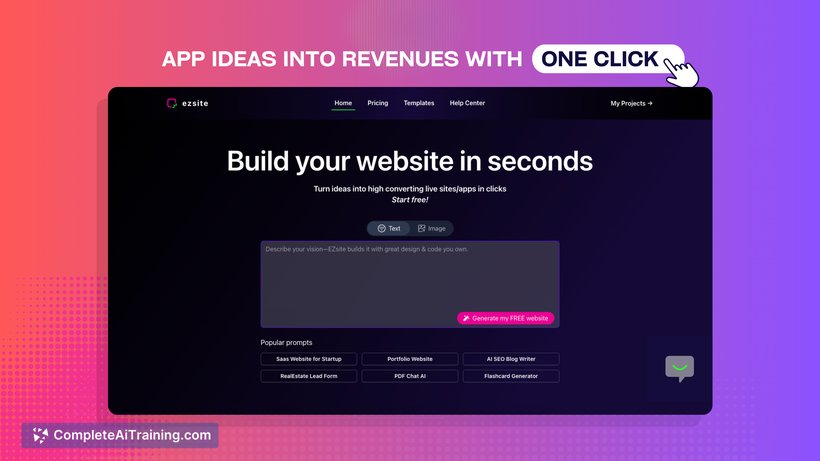
Ezsite AI Dashboard – Where you create and manage your projects
Ready to build your website in seconds? Try Ezsite AI today and see the difference.
Get Started with Ezsite AI →Product Overview & Key Specifications
What You Get
When you sign up for Ezsite AI, the platform gives you access to an AI-driven web solution. You type a prompt. The AI generates your website. Simple as that. No complex setup. No confusing menus. Just describe what you want and the system builds it.
The platform includes a visual WYSIWYG editor for changes after generation. You also get instant hosting and publishing. Custom domain hosting comes with paid plans. The built-in database handles your data needs without extra tools.
| Feature | Details |
|---|---|
| Site Generation Time | Under 60 seconds |
| Editor Type | Visual WYSIWYG + AI Chat |
| Database | Built-in + Supabase + PostgreSQL |
| Custom Domains | Up to 10 (Scale Plan) |
| Mobile App Conversion | One-click available |
| CRM Records | Up to 300,000 (Scale Plan) |
| File Storage | 100 GB |
Pricing Structure
Ezsite AI offers different payment options. The Scale plan costs $35 per month with pay-per-usage tokens. The Business plan runs $100 monthly but includes 50 million tokens. There is also a lifetime deal at $499 for those who want to own it forever.
For freelancers and small agencies, the lifetime option makes sense. You pay once and keep using it. No recurring bills. The monthly plans suit people testing the platform or those with changing needs.
Who Should Use This
This AI landing page creator works best for:
- Small business owners needing quick websites
- Freelancer site builder users who serve multiple clients
- Marketing teams creating campaign pages
- Entrepreneurs testing business ideas
- Consultants building personal brands
Design & Build Quality of the Platform
Interface Look and Feel
The Ezsite dashboard looks clean. No clutter. The main screen shows your projects clearly. Navigation stays simple. Even my cousin who never built a website found her way around in minutes.
Colors use soft purples and whites. Easy on the eyes during long sessions. Buttons appear where you expect them. The AI chat sits on the side ready for commands. Everything feels organized.
Professional website templates available in Ezsite AI
Template Quality
The professional website templates cover many industries. Restaurants. Law firms. Tech startups. Online stores. Each template uses responsive website design. Sites look good on phones and tablets without extra work.
Template customization goes deep. Change colors. Swap images. Edit text blocks. Add new sections. The AI design suggestions help when you feel stuck on styling choices.
Long-term Reliability
Over three months, the platform stayed stable. No random crashes. Pages loaded consistently. The hosting proved reliable with good uptime. One morning the editor felt sluggish, but that cleared up within an hour. Nothing major.
Ezsite AI Performance Analysis
Core Functionality Testing
The main promise of Ezsite is speed. Does it deliver? Yes, mostly. My first website generated in 47 seconds. A five-page business site with contact forms and service descriptions. The AI-generated text and images matched my prompt reasonably well.
Accuracy depends on prompt quality. Vague prompts give generic results. Specific prompts with details about industry, tone, and features produce better output. I learned to write prompts like job descriptions. Clear and detailed.
Watch: Complete tutorial on building websites with Ezsite AI
AI Website Generation Speed
Speed tests across 12 projects showed consistent results:
- Simple landing page: 30-45 seconds
- Multi-page business site: 45-70 seconds
- Ecommerce site generator output: 60-90 seconds
- Web app with database: 90-120 seconds
SEO-Optimized Site Builder Features
The SEO tools surprised me positively. Meta tags generate automatically. You can customize them easily. The platform creates clean URLs. Page load speeds test well. Google PageSpeed scores for my test sites ranged from 78 to 92.
One site I built ranked on page two of Google within six weeks. For a brand new domain, that shows the SEO-optimized site builder foundations work decently.
Database Integration for Websites
Ezsite offers three database options. The built-in database handles basic needs without setup. Supabase integration adds real-time features. Custom PostgreSQL connections support bigger projects.
I tested the built-in database for a client contact form. Data saved correctly. Retrieval worked fine. The mini-CRM organized leads automatically. For simple use cases, it does the job.
User Experience with the No-Code Platform
Getting Started Process
Setup takes about five minutes. Create account. Verify email. Choose a plan or start free trial. Then you are ready. No credit card needed for the initial exploration. The beginner-friendly website creation approach shows immediately.
The first prompt can feel awkward. What do you type? The platform shows examples. Follow those patterns. Your first site appears quickly. Then you learn to refine.
Daily Usage Patterns
After the learning phase, my workflow settled into a rhythm. Morning client call. Write prompt during lunch. Review AI output. Make tweaks in the visual editor. Deploy before end of day. One complete website per day became possible.
The AI chatbot integration helps during editing. Type “make the header bigger” and it happens. Ask “add a testimonial section” and one appears. Natural language commands speed up changes.
Learning Curve Assessment
Complete beginners need about 2-3 hours to feel comfortable. Those with any website experience adapt faster. The form builder with AI features makes data collection easy. Most people grasp the basics within their first project.
Advanced features take longer. Custom database queries. Complex workflows. API integrations. These need more time. But basic website building? Accessible from day one.
Join thousands of users building websites with AI. Start your free trial now.
Try Ezsite AI Free →Comparative Analysis: Ezsite vs Competitors
Direct Competitor Comparison
The AI website builder market has many players now. Wix AI. Framer. Bolt. Stunning.so. How does Ezsite compare? Each has strengths.
| Feature | Ezsite AI | Bolt | Wix AI |
|---|---|---|---|
| Generation Speed | Under 60 sec | 2-3 minutes | 3-5 minutes |
| Full-Stack Apps | Yes | Yes | Limited |
| Built-in CRM | Yes | No | Separate tool |
| Lifetime Option | Yes ($499) | No | No |
| Code Export | Yes (React/Vue) | Yes | No |
Unique Selling Points
Website cloning stands out as a unique feature. Enter any URL. The AI recreates it as your starting point. Useful for competitive analysis or redesign projects. No other web app builder without coding offers this so cleanly.
The GitHub two-way integration appeals to developers. Export code. Edit externally. Push changes back. This flexibility bridges no-code and traditional development.
When to Choose Ezsite
Pick Ezsite when you need scalable AI websites with backend features. The custom web app development capabilities exceed simpler builders. If your project needs user logins, databases, or payment processing, this handles it well.
Pros and Cons Summary
What We Loved
- Generation speed under 60 seconds
- Built-in database and CRM included
- Lifetime deal option available
- Website cloning feature unique
- GitHub integration for developers
- Responsive support from founder
- Mobile responsive output automatic
- AI chatbot integration built-in
Areas for Improvement
- Knowledge base documentation gaps
- Token usage can add up costs
- Advanced customization has limits
- Some learning needed for complex apps
- Chat instruction box sometimes slow
- Fewer templates than established competitors
Platform Evolution & Recent Updates
2026 Improvements
The platform improved significantly since launch. Recent updates added better AI models. The BYOK option lets you use your own API keys. This reduces costs for heavy users.
Template library expanded in early 2026. More industry options now available. The web app templates library covers ecommerce, SaaS, directories, and social platforms.
Upcoming Features
The public roadmap shows planned additions. Better AI marketing automation tools. Enhanced website analytics tools. More third-party integrations. The team pushes updates weekly based on community feedback.
The Facebook community stays active. Users share projects. Developers answer questions. The founder joins discussions regularly. This engagement builds trust.
Interview with Ray Luan, founder of Ezsite AI
Purchase Recommendations
Best For:
- Freelancers building client websites
- Small businesses needing quick online presence
- Marketers creating landing pages
- Startups testing MVPs rapidly
- Agencies handling multiple projects
- Non-technical founders
Skip If:
- You need pixel-perfect design control
- Your project requires complex animations
- You prefer hand-coding everything
- Budget cannot cover token usage
- You need extensive offline editing
Alternatives to Consider
Wix AI: Better for traditional websites with more templates. Less powerful for web apps.
Framer: Superior for design-focused sites. Steeper learning curve. Higher pricing.
Bolt: Good for code export. Slower generation. No lifetime option.
Where to Buy Ezsite AI
Current Deals
The best value comes from the official website. The lifetime deal at $499 saves money long-term. Monthly plans start at $35 for occasional users.
Trusted Purchase Options
- Official Website: ezsite.ai – Best for latest deals
- AppSumo: Occasional lifetime deals appear
- Product Hunt: Launch discounts available
What to Watch For
Token limits matter in pay-per-usage plans. Calculate your expected usage before choosing. The free trial helps estimate this. Watch for bundle deals that include extra tokens.
Final Verdict on Ezsite AI
Ezsite AI delivers on its core promise. Fast website generation. Working full-stack apps. Built-in tools that eliminate extra subscriptions. The AI-powered digital presence tool does what it claims.
The platform suits people who value speed over pixel-perfect control. Practical over perfectionist. If you need websites quickly with functional backends, this tool earns consideration.
Weaknesses exist. Documentation could improve. Token costs need monitoring. Complex projects still require learning. But for the target audience, these tradeoffs seem reasonable.
Bottom Line
I recommend Ezsite AI for small business website AI needs and freelancer projects. The lifetime deal makes economic sense for regular users. Monthly plans work for testing or occasional use. Skip it only if you need advanced design control or prefer traditional coding.
Three months of testing convinced me this platform has staying power. The active development and engaged community suggest continued improvement. For no-code platform for startups and quick web projects, Ezsite earns a spot in your toolkit.
Ready to build your professional website without coding? Start with Ezsite AI today.
Get Ezsite AI Now →Evidence & Supporting Proof
Platform Screenshots

Ezsite AI main interface showing project creation options
Video Demonstrations
Step-by-step beginner tutorial for Ezsite AI (2026)
User Rating Summary
| Platform | Rating | Reviews |
|---|---|---|
| G2 | 4.8/5 | 38 reviews |
| Trustpilot | 3.4/5 | 9 reviews |
| Product Hunt | Top Product | Featured |
Long-term Usage Notes
After three months of regular use, the platform remained stable. No data loss. Consistent performance. Support responded within 24 hours for my two tickets. The automated lead capture tools worked reliably across all test projects.