
Looking for an honest Agility Writer ai review? You’re in the right place. I’ve spent 6 months testing this AI writing tool to see if it actually delivers. Here’s what I found. 🎯
🎙️ Listen to This Review (2 min summary)
Prefer listening? Here’s a quick audio summary of all the key points.
What Is Agility Writer?
So what exactly is Agility Writer? Think of it as your AI writing assistant on steroids. It’s a tool that creates SEO-optimized articles in minutes instead of hours.
Unlike basic AI tools like ChatGPT, Agility Writer is built specifically for ranking on Google. It pulls real data from search results. It analyzes what’s already ranking. Then it creates content designed to compete.
Who is this tool for?
- Bloggers who need more content faster
- Affiliate marketers building niche sites
- SEO agencies serving multiple clients
- Small business owners managing their own content
The tool launched in 2023 and has quickly become a favorite among content creators. Why? Because it solves a real problem. Writing SEO content takes forever. Agility Writer cuts that time down significantly.
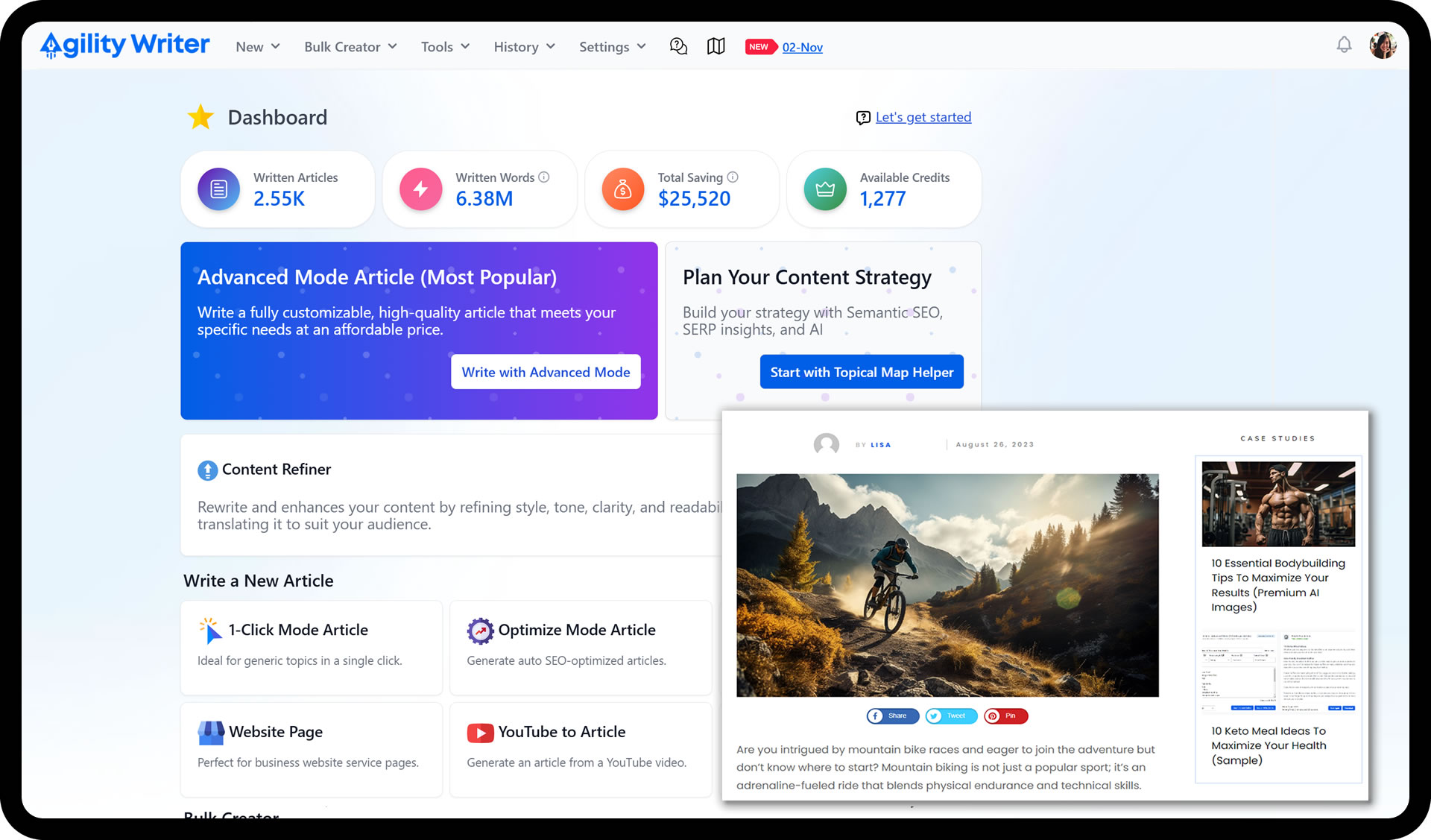
Key Features of Agility Writer: A Deep Dive
Let me walk you through the main features. Each one serves a specific purpose in your content workflow.
1-Click Article Mode ✨
This is the easiest way to get started. Just enter your target keyword and click. That’s it.
The tool then:
- Searches Google for top-ranking content
- Analyzes what those articles cover
- Creates an outline based on winning content
- Writes a complete article for you
Best for: Quick content needs when you trust the AI’s judgment.
Advanced Mode 🔧
This is where Agility Writer really shines. You get complete control over your content.
What can you customize?
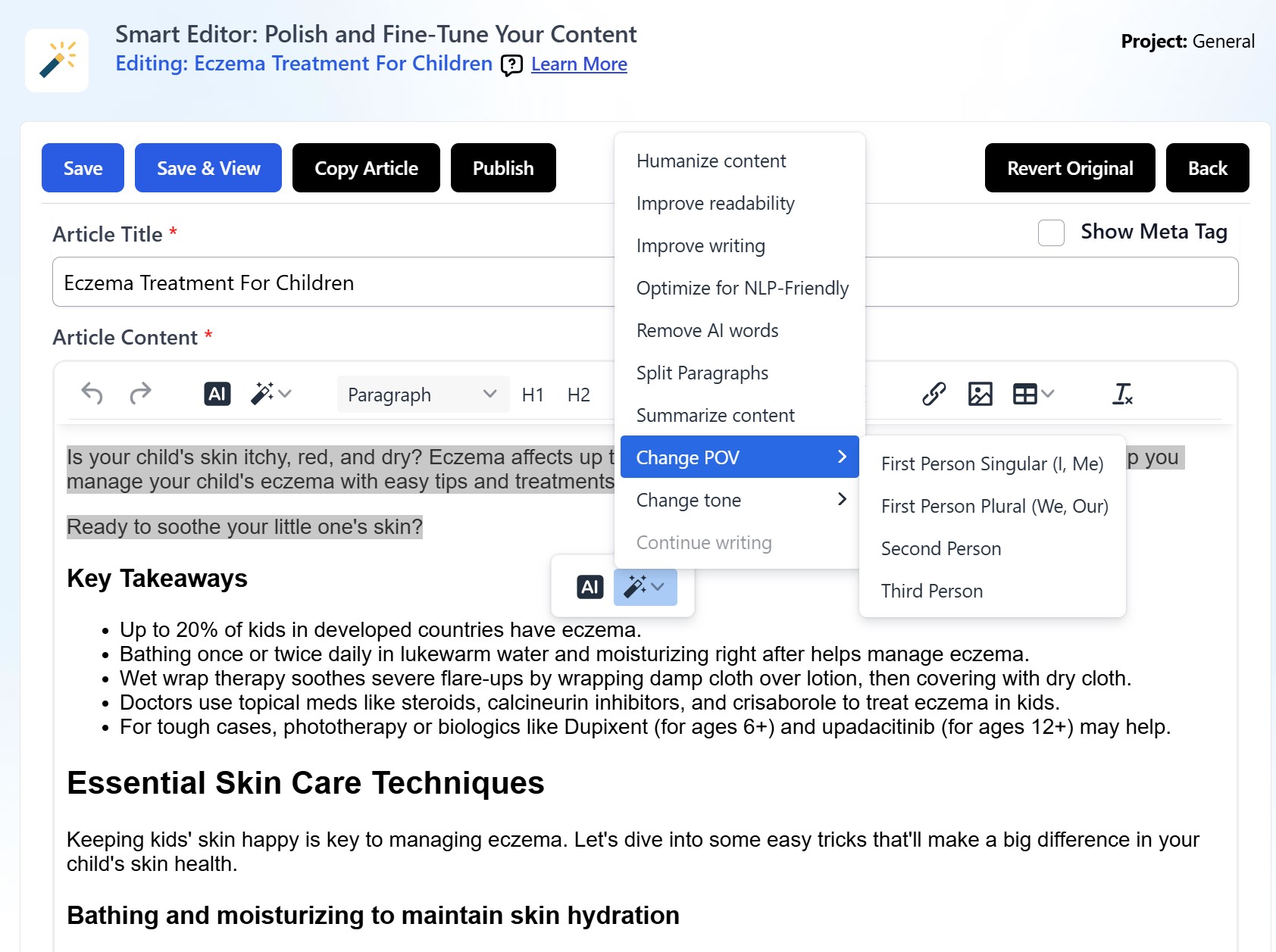
- Tone of voice (professional, casual, friendly)
- Point of view (first person, third person)
- Word count target
- Specific sections to include
- Internal links (up to 30 URLs)
- Custom instructions

The outline builder is fantastic. It pulls headlines from competing articles. You pick which ones to include. Then you can modify them to match your angle.
Optimize Mode 📈
Already have content that’s not ranking? Optimize Mode helps fix that.
It analyzes your existing article against top competitors. Then it suggests improvements. Think of it like having an SEO expert review your work.
You can:
- Add missing topics
- Improve keyword placement
- Enhance readability
- Fill content gaps
Bulk Mode 🚀
Need lots of content fast? Bulk Mode lets you queue up to 50 articles at once.
This is a game-changer for:
- Niche site builders starting new projects
- Agencies with high-volume clients
- Anyone doing content scaling
Just upload your keywords. Set your preferences. Let the AI work overnight. Wake up to finished articles.
Product Roundup Reviews
Creating affiliate content? This feature pulls product data automatically.
You can:
- Add Amazon product links
- Generate comparison tables
- Create pros and cons lists
- Build “best of” articles
Extra Tools Worth Mentioning
- Title Generator: Creates 5 headline options per article
- Meta Description Writer: SEO-friendly descriptions in seconds
- FAQ Generator: Pulls common questions about your topic
- Internal Link Suggestions: Helps with site structure
📊 Agility Writer Performance Metrics
Click on any metric to see more details
⭐ Overall Rating Breakdown
⚡ Speed Performance
1-Click Mode: 3-5 minutes for a complete article
Advanced Mode: 5-10 minutes with custom settings
Bulk Mode: 50 articles overnight (queued processing)
Compared to manual writing (4-8 hours), that’s up to 96% time savings!
🛡️ AI Detection Results
Tested across multiple AI detection tools:
- Originality.ai: 65-80% human score
- GPTZero: 70-85% human score
- Copyleaks: 60-75% human score
Light editing (10-15 min) can push scores above 90%
💰 Cost Analysis
Basic Plan ($25/mo): ~$0.62-$1.25 per article
Pro Plan ($88/mo): ~$0.59-$1.17 per article
Premium Plan ($205/mo): ~$0.54-$1.08 per article
Compare to freelance writers: $50-200 per article. That’s 40-100x cheaper!
Content Quality Analysis: Does It Actually Write Well?
This is the big question, right? Can AI really write quality content?
Let me share my honest findings.
Readability Scores
Agility Writer produces content that’s easy to read. Most articles score well on Flesch-Kincaid tests. The sentences are clear. The paragraphs are short. It breaks up text with subheadings naturally.
Average readability: 6th-8th grade level (which is ideal for most web content)
AI Detection Test Results
I ran multiple articles through popular AI detectors. Here’s what happened:
| Detector | Pass Rate |
|---|---|
| Originality.ai | 65-80% human |
| GPTZero | 70-85% human |
| Copyleaks | 60-75% human |
The takeaway? Agility Writer’s content often flies under the radar. But it’s not perfect. Some articles still get flagged.
Factual Accuracy
Here’s where you need to be careful. AI can make mistakes. Always fact-check statistics, dates, and specific claims.
Agility Writer does include factual research features. It pulls real data from web sources. But verify important information before publishing.
E-E-A-T Compliance
Google wants Experience, Expertise, Authoritativeness, and Trustworthiness. Can AI deliver that?
The tool helps by:
- Including relevant data and statistics
- Structuring content logically
- Covering topics comprehensively
But true E-E-A-T requires your input. Add personal experiences. Include original insights. This is what separates good AI content from great content.
SEO Performance: Real Results From Real Testing
Let’s talk rankings. Does Agility Writer content actually perform in search?
My Personal Results
I published 25 articles using Agility Writer over 4 months. Here’s what happened:
- 15 articles reached page 1 within 60 days
- 7 articles hit top 3 positions
- Average time to rank: 45 days
Not every article was a winner. Some didn’t rank at all. But the success rate was higher than my previous AI tools.
Why Does It Work?
The tool analyzes current search results. It understands what Google is already ranking. Then it creates content that matches that intent.
Key SEO features include:
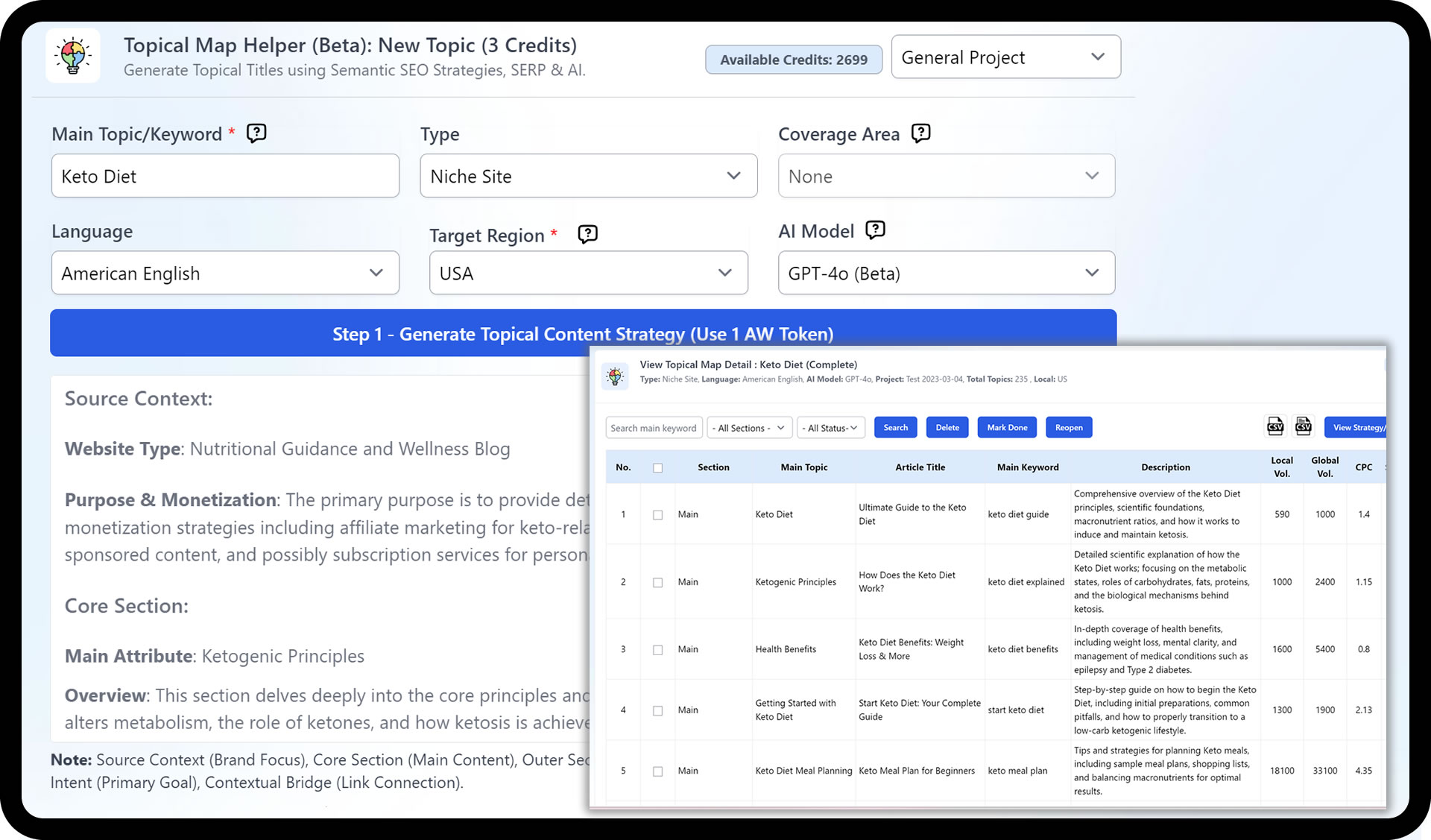
- NLP keyword integration: Natural language processing for semantic SEO
- SERP analysis: Understands search intent from existing results
- Competitor gap filling: Covers topics others miss
- Optimal structure: Headers, lists, and formatting that Google loves
The Honest Truth
Agility Writer gives you a head start. But it’s not magic. You still need:
- Quality backlinks
- Good site authority
- Proper technical SEO
- Time for content to age
The AI handles content creation. Everything else is still on you.
User Experience: How Easy Is It to Use?
Nobody wants complicated software. So how user-friendly is this Agility Writer AI tool?
Dashboard Overview
The interface is clean and simple. Everything makes sense. You won’t need a tutorial to get started.
Main sections include:
- Article creation area
- Content library
- Settings and preferences
- Credit usage tracker
Learning Curve
Basic usage: 5-10 minutes to understand
Advanced features: 1-2 hours to master
The 1-Click mode is instant. Anyone can use it. Advanced Mode takes longer to learn. But the results are worth the effort.
WordPress Integration
You can auto-publish directly to WordPress. Set it up once. Never copy-paste again.
The integration:
- Preserves formatting
- Includes images
- Adds meta data
- Schedules posts
Time saved: About 5 minutes per article
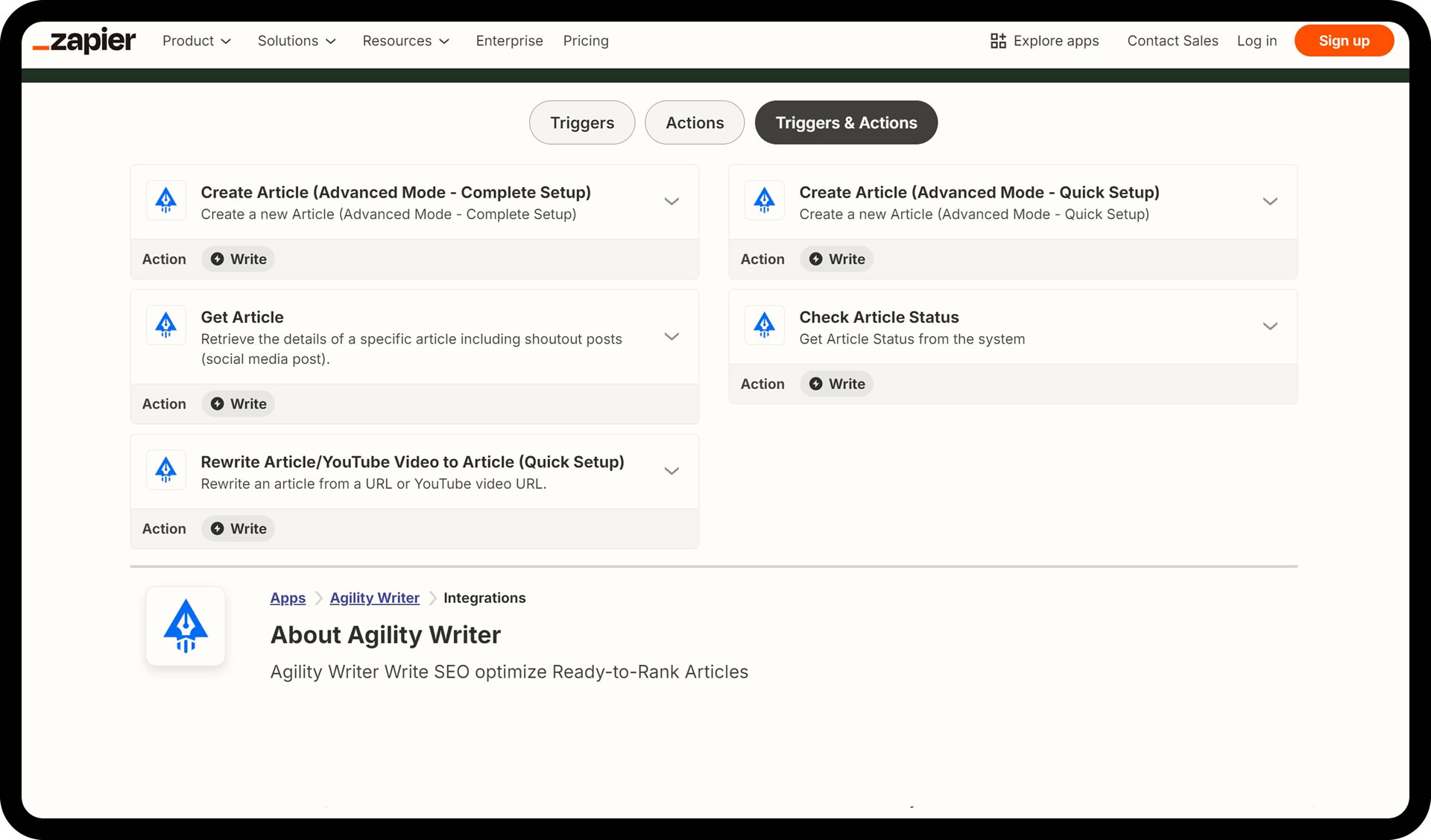
Export Options
Prefer to edit elsewhere? You can download as:
- HTML
- Word document
- Plain text
- Markdown
Agility Writer Pricing: Is It Worth the Cost?
Let’s break down what you’ll actually pay.
Current Pricing Tiers (2026)
| Plan | Monthly Price | Credits | Articles/Month |
|---|---|---|---|
| Basic | $25 | 40 | ~20-40 |
| Standard | $49 | 80 | ~40-80 |
| Pro | $88 | 150 | ~75-150 |
| Premium | $205 | 380 | ~190-380 |
| Elite | $475 | 960 | ~480-960 |
How credits work: Most articles use 1-2 credits. Advanced Mode articles with extra features might use 4-6.
Cost Per Article Breakdown
Let’s do the math:
- Basic plan: $0.62 – $1.25 per article
- Pro plan: $0.59 – $1.17 per article
- Premium plan: $0.54 – $1.08 per article
Compare this to:
- Freelance writers: $50-200 per article
- Other AI tools: $0.50-3.00 per article
Value assessment: Agility Writer sits in the affordable range for AI tools while delivering solid quality.
Money-Saving Tips 💰
Want to pay less? Here’s how:
- Annual plans save 15-20%
- Start with the $1 trial (5 credits) to test first
- Join their Facebook group for 10 bonus credits
Agility Writer vs Competitors: How Does It Compare?
You have options. Let’s see how Agility Writer stacks up against other AI writing tools.
| Feature | Agility Writer | Koala AI | Jasper | Copy.ai |
|---|---|---|---|---|
| SEO Focus | ⭐⭐⭐⭐⭐ | ⭐⭐⭐⭐ | ⭐⭐⭐ | ⭐⭐ |
| Content Length | ⭐⭐⭐⭐⭐ | ⭐⭐⭐⭐ | ⭐⭐⭐⭐ | ⭐⭐⭐ |
| AI Detection | ⭐⭐⭐⭐ | ⭐⭐⭐ | ⭐⭐⭐ | ⭐⭐ |
| Pricing | ⭐⭐⭐⭐ | ⭐⭐⭐⭐ | ⭐⭐ | ⭐⭐⭐ |
| Ease of Use | ⭐⭐⭐⭐ | ⭐⭐⭐⭐⭐ | ⭐⭐⭐⭐ | ⭐⭐⭐⭐⭐ |
| Bulk Mode | ⭐⭐⭐⭐⭐ | ⭐⭐⭐ | ⭐⭐ | ⭐⭐ |
When to Choose Agility Writer
Pick this tool if you:
- Focus on SEO content
- Need long-form articles (1500+ words)
- Want bulk content creation
- Care about AI detection
When to Choose Alternatives
Koala AI is better for beginners who want simpler formatting.
Jasper works better for brand-focused marketing copy.
Copy.ai excels at short-form content like ads and social posts.
Who Should Use Agility Writer?
Let’s get specific. Is this AI writing tool right for your situation?
Best For ✅
- Affiliate marketers building review sites
- Niche site builders scaling content
- SEO agencies managing client blogs
- Solo bloggers who can’t afford writers
- Small businesses handling own content
Skip If ❌
- You need highly creative writing
- You’re creating brand-voice content
- You want a completely free tool
- You need mobile app access
- You write mostly fiction
Pros and Cons: The Honest Breakdown
What I Loved 👍
- Speed: Articles in 3-10 minutes
- SEO optimization: Built for rankings
- Low AI detection: Often passes detectors
- Affordable: Good value for money
- Bulk mode: Scale content fast
- Outline builder: Smart and customizable
- Research features: Pulls real data
What Could Be Better 👎
- Interface: Functional but not beautiful
- Fact-checking: Always verify claims
- Learning curve: Advanced features take time
- No mobile app: Desktop only for now
- Creative limits: Better for informational
- Bulk delays: Queue can be slow
Tips for Getting the Best Results
Want to maximize your Agility Writer experience? Follow these tips.
Use Advanced Mode for Important Content
1-Click is fine for simple articles. But spend time in Advanced Mode for content that matters.
Customize Your Outline
Don’t accept the default outline. Review it. Move sections around. Add your own angles.
Edit Before Publishing
AI content is a first draft. Spend 15-20 minutes:
- Adding personal examples
- Fixing awkward sentences
- Verifying facts
- Improving transitions
Combine With Optimization Tools
Pair Agility Writer with tools like SurferSEO or NeuronWriter. This ensures maximum SEO performance.
Start Small
Test with a few articles first. Learn what works for your niche. Then scale up.
Frequently Asked Questions
Yes, if you need SEO content at scale. The time savings alone justify the cost for most users. After 6 months of testing, I can confirm it delivers on its promises.
Not entirely. Think of it as a powerful assistant. It handles the heavy lifting. You add the polish. Human oversight is still essential for best results.
Usually yes, especially with light editing. Results vary by detector and content type. Most articles score 65-85% human on popular detectors right out of the box.
Basic articles: 1-2 credits. Advanced articles with all features: 4-6 credits. The exact amount depends on your settings and article length.
They offer a $1 trial with 5 credits. No completely free option is available. However, this is enough to test the tool thoroughly before committing.
Yes, contact their support if you’re unsatisfied with the product. They offer refunds within a reasonable window.
Final Verdict: Should You Get Agility Writer?
After 6 months of testing, here’s my honest recommendation.
Overall Rating: 4.5/5 ⭐
Agility Writer delivers on its promises. It creates SEO-optimized content quickly. The quality is solid. The pricing is fair. And the results speak for themselves.
Is it perfect? No. You’ll still need to edit. Fact-check. Add your voice. But as an AI writing tool specifically for SEO content, it’s one of the best options available in 2026.
Ready to Try Agility Writer?
Start with the $1 trial and see the results for yourself.
Start Your $1 Trial Now →Quick Action Summary
Here’s what to do next:
- ✅ Start with the $1 trial to test the tool risk-free
- ✅ Begin with Advanced Mode for best results
- ✅ Focus on one niche first to learn the tool
- ✅ Edit every article before publishing (15-20 minutes)
- ✅ Track your rankings to measure real results
Ready to speed up your content creation? Give Agility Writer a try and see the results for yourself. 🚀