
Managed WordPress hosting for high volume blogs handles sites that get 400,000 to millions of monthly visitors. Unlike basic shared hosting (good for 10,000-100,000 pageviews), these specialized plans keep your blog fast during traffic spikes. Performance tests show top providers deliver 365ms average response times. Edge caching makes sites load 3x faster. This guide covers what to look for and which hosts actually deliver.
Need Hosting That Grows With Your Blog?
Start with Hostinger’s managed WordPress plans starting at just $2.69/month. Scale without limits.
Get Started Now →
Top managed WordPress hosting providers deliver consistent performance for high traffic blogs
Key Findings at a Glance
Why Standard Web Hosting Fails High Volume Blogs
Most new bloggers start with shared hosting. That works fine when you get a few hundred visitors daily. But traffic growth brings problems fast. Shared servers pack thousands of sites together. Each one fights for the same CPU cycles and RAM. Your blog slows down just when readers start finding your content.
Data from hosting benchmarks shows shared hosts experience 6x more outages than managed WordPress plans. Bluehost failed load tests with 79% error rates when simulating 100 concurrent visitors. That translates to real users seeing error pages during your busiest moments.
Desktop pages load in 2.5 seconds on average. Mobile? That jumps to 13.25 seconds. A slow mobile experience hurts your Google rankings. It also drives away readers who clicked your link from social media. WordPress powers 43.5% of all websites now. Competition for reader attention is fierce. Every second of delay costs you audience.
The Traffic Threshold
Research from Pantheon indicates shared hosting handles 10,000 to 100,000 monthly pageviews reliably. Once you cross 100,000, performance degrades noticeably. Managed WordPress takes over from there, supporting 400,000 to millions of monthly visitors.
The jump isn’t gradual. It’s sudden. One day your server responds quickly. The next, it times out during a viral post. Your audience learns your site is unreliable. They don’t come back. That’s why picking the right hosting from the start matters more than saving a few dollars monthly.
What Makes Managed WordPress Hosting Different for High Volume Blogs
Managed WordPress hosting providers optimize their servers specifically for WordPress. That means automatic updates for core files and plugins. It means server configurations tuned for PHP execution and database queries. It means content delivery networks that cache your pages globally.
Shared hosting companies treat WordPress like any other website. Managed providers build infrastructure around WordPress’s unique needs. Varnish caching, Redis object caching, nginx web servers—these tools appear in managed stacks but rarely on shared plans.
Container-Based Architecture
Top managed hosts use container technology. Each site runs in its own isolated environment. Your blog can’t slow down because a neighbor site’s code went bad. Resources scale automatically when traffic spikes hit. You get guaranteed CPU and memory allocation that doesn’t depend on other customers’ behavior.
Cloud hosting adds another layer. Resources adjust in real-time based on demand. A post that lands on Hacker News or goes viral on Twitter triggers automatic scaling. Your readers see fast load times even during unexpected traffic floods.
Performance Monitoring Tools
Enterprise managed hosting includes tools like New Relic for real-time performance tracking. You see exactly which plugins slow your site. Database queries get analyzed. Bottlenecks appear before they become user-facing problems. That visibility saves hours of debugging when your blog grows complex.
Which Performance Metrics Matter Most for High Volume Blogs
Not all hosting metrics matter equally. Understanding what drives user experience helps you pick the right provider. Three metrics stand out as most important for high traffic WordPress sites.
Time to First Byte (TTFB)
TTFB measures how quickly your server starts sending data after a visitor clicks your link. Industry benchmarks from 2025 show an average TTFB of 485ms across tested providers. The gap between fastest and slowest is enormous—WP Engine hits 365ms while DreamPress averages 663ms. That’s nearly 2x slower.
WP Engine reclaimed the top spot after five years with consistent 365ms TTFB. The range between their best and worst days is only 244ms. Compare that to ChemiCloud, which swings from 370ms to 2043ms—a 1,673ms range showing wild inconsistency.
| Provider | Average TTFB | Performance Tier |
|---|---|---|
| WP Engine | 365ms | Elite |
| Rocket.net | 373ms | Elite |
| Templ | 386ms | Elite |
| WPX Hosting | 411ms | Strong |
| Kinsta | 459ms | Strong |
| Industry Average | 485ms | — |
Uptime Guarantees
No hosting provider achieved 100% uptime in 2025. That’s a key finding from year-long monitoring. Templ came closest with 99.9996% uptime—only 2 minutes of downtime across the entire year. WP Engine, Cloudways, and WPX Hosting all maintained 99.99%+ performance.
Downtime hits harder for high volume blogs than small sites. Each minute offline means lost readers and potential revenue. SiteGround had 44 outage events in 2025, totaling over 3 hours offline. That accumulates into real audience erosion.
Load Testing Results
Load tests simulate 100 concurrent visitors. This shows how hosting handles traffic spikes. Pressable responded in just 12ms with zero errors. WordPress.com came in at 16ms. GreenGeeks managed 26ms. Several providers failed entirely—HostGator showed 2% error rates, Bluehost crashed with 79% errors.
For high volume blogs, surviving load tests matters more than winning them. Your hosting needs to handle viral moments without serving error pages to new visitors.
Why Edge Caching Is Critical for Global Audiences
If your readers come from multiple countries, edge caching determines your real-world performance. Standard hosting serves pages from one data center location. Visitors in Australia wait longer than those near your US server.
Edge caching distributes your content across 70+ global locations. When someone in Tokyo visits your blog, they get a cached copy from a Japanese server. The difference is dramatic. Benchmark data shows edge caching hosts average 154ms global TTFB. Hosts without edge caching average 478ms—that’s 3x slower.
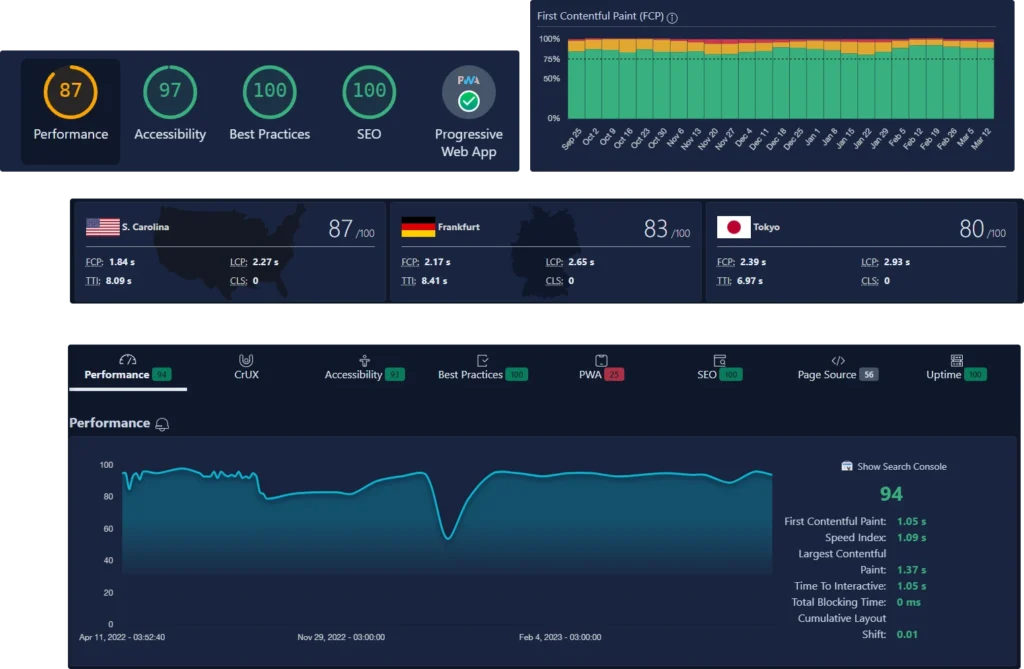
Performance benchmarks show dramatic differences between hosting providers under load
CDN vs No CDN Performance Gap
Not all CDN implementations are equal. Hosts with true edge caching (serving complete pages from edge nodes) outperform those using CDN only for static assets. Static asset CDN showed no measurable advantage over origin-only hosting in benchmarks. The key phrase: “Edge caching is the biggest performance lever—3x faster than static CDN or no CDN.”
When evaluating hosts, ask specifically about edge caching. Many claim CDN support but only cache images and CSS files. Full-page edge caching requires more sophisticated infrastructure. Providers like WP Engine, Rocket.net, and Templ implement true edge caching properly.
Speed Matters for Your Readers
Cloudways combines edge caching with on-demand scaling. Try it with a 3-day free trial.
Compare Plans Now →Security Features Every High Volume Blog Needs
Popular blogs attract unwanted attention. According to Wordfence data, WordPress faces attacks every 32 minutes in 2025—improved from every 22 minutes in 2024. High volume sites with more traffic get targeted more frequently. Plugin vulnerabilities account for 95% of successful attacks.
Essential Security Layers
SSL certificates protect data between your readers and your server. Every managed WordPress host includes this by default now. DDoS protection blocks traffic floods designed to take your site offline. Malware scanning catches infections before they spread.
Automated security patches matter most. When a vulnerability appears in WordPress core or popular plugins, you need fixes within 24 hours. Managed hosts apply these updates automatically. Shared hosting often lags, leaving sites exposed for days.
| Security Feature | Description |
|---|---|
| SSL Certificates | Encrypts data transfer, required for HTTPS |
| DDoS Protection | Blocks traffic attacks attempting to overwhelm servers |
| Malware Scanning | Detects infections before they affect visitors |
| Automated Patches | Fixes vulnerabilities within 24 hours automatically |
| Web Application Firewall | Filters malicious traffic at the server level |
Support Quality During Security Events
When something goes wrong, expert support becomes priceless. Top managed hosts offer 24/7 support with WordPress-specific expertise. They can restart services, clear malware, and restore backups without you touching code. Budget hosts often route security issues to generic support queues.
How to Evaluate Scalability for Growing Blogs
Your hosting needs change as your blog grows. What works at 100,000 monthly visitors may fail at 500,000. Evaluating scalability helps you avoid painful migrations later.
Traffic Spike Handling
Container-based infrastructure scales automatically. When your content gets shared widely, containers spin up to handle demand. Cloud hosting adjusts resources in real-time. You shouldn’t need to contact support to handle viral moments.
Kinsta’s infrastructure runs on Google Cloud and AWS, using Kubernetes for container orchestration. That means near-infinite horizontal scaling. WP Engine uses a similar approach with their proprietary Evercache technology. Both handle traffic spikes without degradation.
Database Optimization
High volume blogs accumulate thousands of posts, comments, and plugin data. Database performance becomes a bottleneck. Managed hosts optimize MySQL configurations for WordPress workloads. Redis object caching reduces database queries by storing frequent results in memory.
Pressidium, another managed provider, uses Redis extensively. Their architecture handles 100x more database operations than default WordPress configurations. For blogs with heavy comment sections or WooCommerce stores, database optimization prevents slowdown.
Top Managed WordPress Hosting Providers for High Volume Blogs in 2026
Benchmark testing across 30 providers reveals clear winners and losers. Here’s how the top performers compare for high traffic blogs.
| Provider | Starting Price | TTFB | Uptime | Best For |
|---|---|---|---|---|
| WP Engine | $31/month | 365ms | 99.99% | Overall performance |
| Kinsta | $35/month | 459ms | 99.97% | Developer features |
| Cloudways | $14/month | 449ms | 99.99% | Budget-conscious |
| Rocket.net | $50/month | 373ms | 99.99% | Edge caching focus |
| Templ | $15/month | 386ms | 99.99% | Consistency |
Budget-Friendly Options
Cloudways starts at $14/month, making managed WordPress accessible for growing blogs. You get choice between AWS, Google Cloud, DigitalOcean, Vultr, or Linode backends. Pay-as-you-go pricing means you only use resources you need. Load test performance shows 0% error rate at 100 concurrent visitors.
Hostinger offers plans starting at $2.69/month for basic WordPress hosting. That’s not managed WordPress specifically, but their business plans at $6.99/month include many managed features. TTFB of 483ms and 99.99% uptime make them competitive. Load test results show 245ms response, acceptable for non-critical deployments.
Enterprise Solutions
Pagely at $375/month and WP VIP for custom pricing serve Fortune 500 companies. They offer dedicated infrastructure, custom caching rules, and white-glove support. Most high volume blogs don’t need enterprise pricing, but knowing it exists helps set expectations.
See It In Action: Top Hosting Providers Reviewed
Reading about performance is one thing. Watching real tests helps you understand what to expect. Here’s a comprehensive review comparing top managed WordPress hosts.
More Hands-On Reviews
What to Know Before Migrating Your High Volume Blog
Moving a popular blog involves risks. Downtime during migration costs you readers. Search rankings can drop if URLs change. Plugin incompatibilities might surface after the move.
Pre-Migration Checklist
Test your new hosting before moving anything. Most providers offer staging environments. Clone your site there. Verify all plugins work. Check that your theme displays correctly. Run performance tools comparing staging site speed against production.
Backup everything before touching DNS records. Create full site exports including database and uploaded files. Store copies locally, not just on the old server. If migration fails, you need clean restoration options.
DNS and URL Considerations
Keep your domain registrar separate from your hosting provider. That gives you flexibility to move without domain transfer complications. If URLs will change at all, set up 301 redirects before migration day. Search engines expect redirects to preserve rankings.
Most managed hosts handle migrations for free. WP Engine, Kinsta, and others include automated migration plugins and expert assistance. Use those services. Expert hands reduce risk significantly.
Understanding the True Cost of Managed WordPress Hosting
Managed WordPress hosting costs 5-10x more than basic shared hosting. Understanding where that premium goes helps justify the investment.
Hidden Savings
Time spent managing a slow site costs more than hosting fees. Developer hours debugging performance issues add up quickly. If you value your time at $50/hour, losing 10 hours to hosting problems equals $500. Premium hosting that “just works” often costs less than the debugging time it prevents.
Security incidents carry hidden costs too. Malware removal services charge $500-2000 typically. Data breaches from unpatched vulnerabilities destroy reader trust. The managed hosting premium includes security updates and monitoring that prevent these scenarios.
When Shared Hosting Makes Sense
New blogs under 50,000 monthly visitors can thrive on quality shared hosting. Bluehost and SiteGround offer shared plans under $10/month that handle moderate traffic well. The key: choose providers with solid infrastructure, not the cheapest option.
Migrate when you notice performance degradation, not after complete failure. Signs include TTFB increasing over weeks, occasional 503 errors during normal traffic, and support tickets taking days to resolve.
Implementation Guide: Moving to Managed Hosting
Week 1: Research and Selection
List your current pain points with hosting. Monitor your site’s TTFB using tools like GTmetrix or WebPageTest. Document peak traffic times and any incidents. Research providers matching your requirements. Sign up for trials or short-term plans.
Week 2: Testing on Staging
Clone your site to staging environments on candidate hosts. Install your full plugin set. Test key user flows: homepage loading, post pages, comment submission, contact forms. Run performance benchmarks comparing staging against current production.
Week 3: DNS Preparation
Verify domain registrar access. Document current DNS records. Set up new hosting accounts. Configure SSL certificates. If using new URLs, create redirect mapping spreadsheet. Test that staging environment performs at expected levels.
Week 4: Migration Execution
Schedule migration during your lowest traffic period. Run automated migration tools if available. Alternatively, export full backup and import to new host. Update DNS records, pointing to new servers. Monitor for errors immediately.
What to Expect From Managed WordPress Hosting in 2026 and Beyond
The hosting landscape continues evolving. Edge computing, AI-powered optimizations, and new infrastructure patterns change what’s possible.
Edge Computing Expansion
Edge caching will become standard, not premium. Providers currently charging extra for edge performance will include it baseline. The 3x speed advantage of edge caching today becomes the minimum expectation tomorrow.
AI-Assisted Performance Tuning
Machine learning optimizes server configurations automatically. WP Engine already uses AI for cache tuning. Expect more providers adopting similar approaches. Your hosting will adapt to traffic patterns without manual intervention.
Serverless WordPress Architecture
Headless WordPress with serverless frontends gains traction. Decoupling the CMS from the presentation layer enables infinite scale. High volume blogs will increasingly explore this architecture for maximum performance.
Ready to Upgrade Your Blog’s Hosting?
Start your migration journey today. Get expert help and fast infrastructure from Hostinger.
Start Your Free Trial →Next Steps: Your Action Plan
- Measure your current performance using GTmetrix or WebPageTest. Document TTFB and load times before making changes.
- Research candidate providers using benchmark data. Focus on TTFB consistency and uptime history, not just advertised features.
- Test on staging environments before committing. Every major provider offers staging. Use it.
- Plan your migration during low-traffic periods. Include rollback procedures in case issues arise.
- Monitor post-migration performance for at least two weeks. Compare against pre-migration benchmarks to verify improvement.
Managed WordPress hosting for high volume blogs costs more upfront. The performance gains, reduced stress, and reader satisfaction justify that premium. Your audience notices speed. Search engines reward consistency. Start evaluating options this week.
Frequently Asked Questions
Related Guides on SubashReview
- WordPress Performance Optimization Guide – Learn how to speed up your WordPress site beyond hosting improvements
- Best WordPress Plugins for 2026 – Essential plugins for security, speed, and functionality
- Cloud Hosting vs Shared Hosting Comparison – Understand which hosting type suits your needs
- WordPress Security Checklist for Bloggers – Protect your high traffic blog from threats
- How to Scale WordPress for Million Visitors – Technical guide for massive traffic events